


Table of contents
If you’re looking at how to track AI referral traffic effectively, the first thing to understand is that you’re solving two distinct problems at once: a data quality problem and a strategic one.
The data quality problem is structural. Many AI platforms, particularly ChatGPT for free-tier users, suppress HTTP referrer headers entirely. When a buyer reads a ChatGPT response, copies a URL from it, and navigates directly to your site, GA4 has no referral signal to work with.
It logs the visit as Direct – indistinguishable in your reports from someone who bookmarked your homepage months ago. Perplexity, Gemini-in-Chrome, and Microsoft Copilot behave similarly, varying by platform and session context. Users who manually type URLs after seeing them in AI responses only add to this ‘dark pool’.
AI use is moving from amateur to habitual, making your tracking gap bigger ChatGPT’s growth from a curiosity to a daily professional tool has been dramatic – and the trajectory has direct implications for how much B2B website traffic is going unattributed.
| Date | Weekly Active Users | Key context |
| Nov 2023 | 100 million | ChatGPT hits 100M weekly active users, first major milestone |
| Dec 2024 | 300 million | User base triples in 12 months as AI tools enter mainstream use |
| Feb 2025 | 400 million | 33% growth in just two months; free-tier mobile app downloads accelerate |
| Mar 2025 | 500 million | Enterprise and education plans drive growth alongside consumer adoption |
| Aug 2025 | 700 million | 4x year-on-year surge; daily messages surpass 3 billion |
| Dec 2025 | 900 million+ | Growth rate accelerating; ChatGPT becomes 4th most visited site globally |
Source: DemandSage ChatGPT Statistics (2026)
Critically, the growth in mobile app usage is compounding the tracking problem further. When users access ChatGPT or Perplexity via smartphone apps and then navigate to a website, the app environment strips referral data entirely. There’s no HTTP referrer to pass. Every app-originated AI referral arrives as Direct traffic, with no indication of its true source
“The data tells a clear story: AI use is shifting from ‘amateur’ to ‘habitual’. Users who signed up for ChatGPT in the hype 2024 are now sending nearly twice as many messages per day as they were a year ago. But as AI tools embed themselves into daily professional workflows the referral tracking gap is widening proportionally. New professional subscriptions lead to prompts to download mobile and desktop apps for primary usage. Marketers are gaining more AI-influenced buyers and less visibility into them at the same time.”
The strategic problem runs deeper. According to Semrush’s June 2025 research study, AI-referred visitors convert at rates 4.4x higher than traditional organic visitors.
These are buyers who’ve already received a synthesized, curated recommendation before they reach your site. They arrive informed, pre-qualified, and closer to a decision than almost any other source. When that channel is buried inside Direct, marketing teams systematically undervalue it, misattribute pipeline elsewhere, and make budget decisions on fundamentally incomplete evidence.
Most B2B buyer journeys are decided before they become visible in your analytics
Discover how to track the hidden B2B buyer journeys your analytics platforms can’t see.
Compounding both problems: GA4’s Consent Mode v2 adds a layer of modeled data uncertainty, cookie consent declines fragment journey tracking further, and there’s currently no industry standard for measuring AI visibility or citation performance.
A lot of this will be grim reading for web analysts. But worry not – while perfect AI attribution isn’t possible today, there’s still a great deal you can do.
Best practice tracking & analytics setup
So how do you track AI referral traffic in Google Analytics?
Getting your foundation right is the precondition for everything that follows. Before layering on attribution models or third-party monitoring tools, there are two categories of work every team should prioritize: technical optimization for AI crawlers, and GA4 custom channel configuration.
Think of this as getting the ground-floor plumbing right before you worry about the architecture.
Setting up an ‘AI traffic channel’ in GA4
This is the single most impactful step most teams haven’t taken. GA4’s default channel grouping has no category for AI referral traffic, which is why it bleeds into Direct, Unassigned, and generic Referral.
Creating a custom channel group takes under thirty minutes and applies retroactively to historical data, giving you an immediate baseline to work from when you try to track Perplexity traffic or ChatGPT referral traffic in GA4.
There are two ways to do this:
Option 1: Reconfigure your Default Channel Groups
This method is useful to show AI referral traffic alongside referral traffic from other channels.
- Navigate to Admin → Data Display → Channel Groups and select your existing default channel group
- Click New Channel Group and name it something clear, such as ‘AI Traffic’
- Add a new channel named AI Referral and set the condition to Session Source matching the following regex pattern:
(direct)(chatgpt|perplexity|gemini\.google|copilot\.microsoft|
claude\.ai|deepseek|grok|mistral|poe\.com|kagi)|(not set)
This regex also includes Direct and Not Set traffic as an option, because it is helpful to monitor trends in the same view, alongside each other. For example, if there are anomalies, such as unexplained spikes and dips.
- Position the AI Referral channel above the Referral rule in the channel group ordering. This is critical: GA4 evaluates rules sequentially and assigns traffic to the first match.
If Referral sits higher, AI referrals that do pass header data will be swallowed into the generic Referral bucket before your custom rule fires
💡 Why ordering matters
GA4 channel groups are evaluated top to bottom. Your AI Referral channel must sit above the generic Referral rule or correctly-tagged AI sessions will be misclassified. Many teams configure the regex correctly and still see no AI channel data because of this single ordering error.
Option 2: Build a custom GA4 dashboard for AI traffic
This method provides more information on sources of traffic (e.g. Perplexity vs. ChatGPT, etc.). A more detailed step-by-step guide is available on Google’s Analytics Help Centre.
- In Google Analytics → Reports → click Library
- Select Create new report → Create detail report
- Click Blank and use the ‘custom report’ panel to configure your dimensions, metrics and filters
- Use the same regex pattern in option 1 to isolate referral traffic from AI platforms
(direct)|(chatgpt|perplexity|gemini\.google|copilot\.microsoft|
claude\.ai|deepseek|grok|mistral|poe\.com|kagi)|(not set)
These configurations won’t capture AI traffic that suppresses referrer headers entirely. Nothing in GA4 will. But it correctly classifies the portion that does pass referral data, and gives you a dedicated channel to monitor for volume trends, landing page patterns, and conversion behavior.
Server-side tracking & log analysis
GA4 relies on JavaScript execution, meaning it captures human browser sessions but not AI crawler activity. Server logs capture everything: every request, every user agent, every crawl.
Analyzing your logs for AI bot user agents (GPTBot, ClaudeBot, PerplexityBot and others) gives you visibility into which pages AI systems are actively indexing, how frequently, and from which platforms. This isn’t a measure of AI-referred human traffic, but it’s a meaningful signal about your AI discoverability.
The harder analytical challenge is separating AI crawler visits (training and indexing activity) from AI-referred human visits. These require different analytical approaches, and most standard log analysis tools aren’t configured to make the distinction cleanly. It’s a limitation worth acknowledging to stakeholders before they draw the wrong conclusions from log data.
Attribution tools & AI monitoring platforms
For teams that need a fuller cross-platform picture, a growing range of attribution and AI monitoring tools are now available. Here’s a comparison of four worth knowing about:
| Platform | Description | Pros & Cons |
| Dreamdata | B2B revenue attribution platform that maps the full customer journey across touchpoints, connecting marketing activity to closed revenue. | ✔ Joins ad, CRM, and product data to surface pipeline influence even when individual touchpoints are dark. ⚠ Requires significant CRM and ad platform integrations to deliver full value; setup isn’t lightweight. |
| Lead Forensics | Identifies anonymous B2B website visitors by reverse-mapping IP addresses to company records, revealing who is researching you. | ✔ Uncovers company-level intent signals from visits that leave no form-fill or contact footprint. ⚠ IP-to-company matching has accuracy limits and doesn’t identify individual contacts; GDPR compliance requires careful configuration. |
| Scrunch.ai | AI visibility monitoring platform that tracks how brands are cited and represented across LLM platforms including ChatGPT, Perplexity, and Gemini. | ✔ Provides competitive share-of-voice in AI responses, helping teams understand citation frequency across key industry queries. ⚠ Uses simulated queries rather than live buyer sessions, so results reflect AI output patterns rather than actual buyer behavior. |
| Peec.ai | Tracks brand mentions and recommendations across major AI platforms, monitoring visibility in generative AI responses over time. | ✔ Alerts teams to shifts in how AI platforms represent their brand, enabling faster response to citation drops or competitor gains. ⚠ Early-stage tooling; no standardized methodology for AI visibility benchmarking makes cross-platform comparisons difficult. |
These tools sit in two distinct categories. Attribution platforms like Dreamdata and Lead Forensics help you connect observable journey touchpoints to pipeline outcomes. AI visibility tools like Scrunch.ai and Peec.ai monitor how your brand is represented in AI outputs. Both categories have genuine value, but neither replaces a well-configured GA4 setup as your measurement foundation.
🎯 Best practice setup checklist
| Action | Why it matters | ✔ |
| Audit robots.txt for GPTBot, ClaudeBot & PerplexityBot | Ensures AI systems can crawl and index your content for citation | ☐ |
| Implement llms.txt at your site root | Helps AI systems understand your content structure and key pages | ☐ |
| Enable server-side rendering on priority content pages | Makes content visible to AI crawlers that don’t execute JavaScript | ☐ |
| Create custom AI channel group in GA4 with regex pattern | Correctly classifies AI referrals that do pass referrer data | ☐ |
| Position AI Referral channel above Referral in GA4 ordering | Prevents correctly tagged AI sessions being swallowed by generic Referral rule | ☐ |
| Set up server log analysis for AI bot user agents | Reveals which pages AI systems are actively indexing and how frequently | ☐ |
| Export pre-2024 GSC data before it expires | Preserves the pre-AI baseline needed for impact analysis before it falls off the 16-month window | ☐ |
The analytics ‘gap’ in tracking AI referral traffic
Even with best-practice setup in place, significant attribution gaps remain. Understanding where the limits are – and being honest with stakeholders about them – is as important as the technical configuration itself. This section covers the three structural gaps that affect every team working on Google AI mode referral traffic and AI citation measurement.
Google Search Console doesn’t isolate AI Overview traffic. Bing Webmaster Tools does
This is one of the most commonly misunderstood limitations in the current toolkit. Google Search Console doesn’t offer any way to filter or isolate AI Overview or Google AI mode referral traffic performance from standard organic search results. All AI Overview and AI Mode metrics are aggregated under the ‘Web’ search type, alongside conventional results, with no separation available.
In September 2025, a screenshot circulated showing what appeared to be a dedicated ‘AI Overviews’ filter inside Search Console. Understandably, this announcement spread quickly through the SEO community. Google’s John Mueller subsequently confirmed it wasn’t a real feature.
Currently, there’s no such filter and no confirmed timeline for introducing one. Teams that have made attribution decisions based on this rumored capability need to revisit those assumptions.
There is also a time-sensitive data problem that demands immediate action. GSC’s API retains only 16 months of data. Pre-AI baseline data from late 2023 and early 2024 (the period before AI Overviews became widespread) is permanently falling off the rolling window.
Once it’s gone, the ability to establish a clean comparative baseline for measuring the impact of AI Overviews on organic CTR disappears with it. If you haven’t already exported that historical data, do it today.
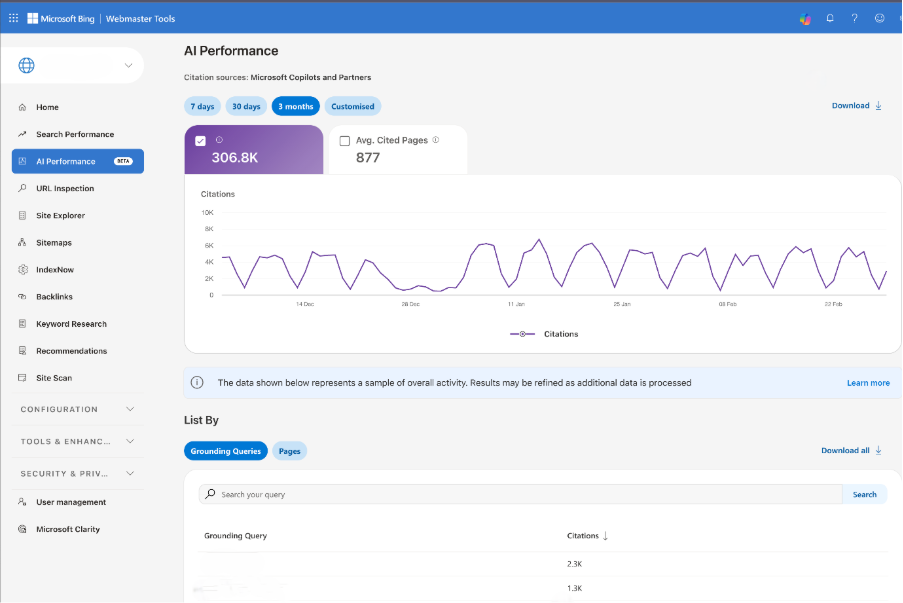
While Search Console may not have this data view available yet, Microsoft’s Bing Webmaster Tools has introduced AI reports that detail what’s happening in Bing AI searches and Copilot. A nice feature here is grouping searches into ‘grounding query’ categories, mitigating the risk of sharing any personally identifiable information.
A proliferating toolset with no industry standard
The market for AI visibility monitoring tools has expanded rapidly and with it, considerable confusion about what’s actually being measured.
Tools including BrightEdge AI Catalyst, Semrush Enterprise AIO, Otterly, and Peec.ai all claim to track AI citations and visibility. However, there’s no industry standard for what ‘AI visibility’ means, how it should be measured, or how results should be benchmarked against competitors.
Many of these tools use synthetic or simulated queries – scripted prompts run at scale to assess whether a brand appears in AI responses. This provides useful directional data on share of voice, but it measures AI outputs under controlled conditions, not actual buyer behavior in real sessions.
🤔 Can marketers rely on synthetic ‘AI visibility data’?
A brand appearing in a simulated ChatGPT prompt isn’t the same as appearing in the specific queries your buyers are actually running. Synthetic AI monitoring tools measure what AI systems say under controlled conditions – not what real buyers are asking, or whether your brand is shaping their decisions.
Treat these tools as strategic signals, not attribution data, and communicate that distinction clearly to anyone relying on their outputs.
LLM platforms lack native publisher analytics
ChatGPT, Claude, Perplexity, and Gemini provide no analytics dashboards for publishers or brands. There’s no equivalent to Search Console or Google Analytics for AI and consequently, no way to see how often your content is cited, which queries trigger it, or what behavior follows a recommendation.
This is a fundamental data gap that will only close when these platforms develop commercial incentives to share it. The optimistic case is compelling: advertising has already begun appearing in Google AI Mode, and as revenue models develop, publisher analytics become significantly more valuable to platform operators. The trajectory of how search analytics evolved between 2004 and 2014 suggests this will change. But it’ll take time and teams should plan for the current opacity to persist for at least the near term.
Shifting expectations for analytics in decision-making
The technical problem of AI attribution has an organizational shadow: leadership still expects clear, confident answers about channel performance, even as the underlying data becomes structurally less certain.
Navigating that tension without losing credibility or retreating into false precision is one of the most underrated professional challenges facing web analysts and marketing operations teams right now.
Accept and communicate a margin of error
If 30-40% of AI referrals will always appear as Direct traffic regardless of GA4 configuration, the question becomes: how do you account for that honestly in reporting?
Start by establishing a baseline. Compare Direct traffic trends before and after the period of significant AI tool adoption growth (broadly, early 2024 onwards). Unexplained spikes in high-quality Direct sessions, particularly those landing on content-heavy pages with strong engagement and conversion rates, are likely candidates for misattributed AI referral traffic. This won’t give you a precise number, but it gives you a directional estimate grounded in observable data.
Then shift how you present AI attribution to stakeholders. Rather than a single point estimate, present ranges:
AI referrals likely represent 5-8% of total traffic based on confirmed referrals plus estimated Direct attribution.
This framing is more honest than the GA4 number in isolation, more defensible under scrutiny, and gives leadership a realistic sense of scale rather than a figure that systematically undervalues a fast-growing channel.
🗣️ Language you can use in stakeholder conversations
“Our GA4 data shows confirmed AI referrals at X%, but given that 30-40% of AI-originated sessions are unattributable by design, the true figure is likely in the range of Y-Z%. We’re presenting a range rather than a point estimate because precision here would be false precision.”
Understand what GA4 Consent Mode V2 is doing to your data
GA4’s Consent Mode v2, mandatory for EEA traffic since March 2024, uses behavioral modeling to recover attribution data lost when users decline cookie consent. In practice, this modeled data is blended into your reports alongside observed data with no clear label distinguishing the two. You can’t easily tell which conversions are real and which are statistical estimates.
For B2B sites with lower traffic volumes, this creates a specific and often unrecognized problem. Consent Mode’s modelling requires a minimum threshold of 700 or more ad clicks over seven days per country and domain pair to activate reliably.
Many B2B sites won’t consistently meet this threshold, meaning the modeling either doesn’t fire or produces unreliable estimates. Analysts need to know whether modeling is active for their properties, document the distinction internally, and be explicit with stakeholders when presenting conversion data that may include a modeled component.
Reframe what AI visibility success looks like
Being cited in AI Overviews or recommended by ChatGPT has genuine brand value even without a measurable click.
The analogy to billboard or radio advertising is imperfect but instructive: reach and familiarity matter even when a specific exposure can’t be directly attributed to a conversion. The buyer who encounters your brand in a ChatGPT response today may search for you directly three weeks later. That downstream branded search, that direct visit, is the traceable signal of an untraceable upstream impression.
This requires recalibrating what ‘success’ looks like in AI channel reporting. Share of voice in AI responses, brand search volume trends, and direct traffic growth in high-intent segments are all proxy signals for AI visibility that your current analytics stack can support today – without waiting for platforms to open up publisher analytics.
Building an AI-ready measurement framework
The teams that will have compounding measurement advantages as AI search continues to grow aren’t the ones waiting for perfect attribution; they’re the ones building frameworks now that are honest about uncertainty, rich in proxy signals, and designed to improve incrementally as the tooling matures.
Here’s how to structure that approach.
Look for AI referral signals inside your Direct traffic
Your Direct channel isn’t a monolith. Within it, AI-referred sessions tend to have a distinctive profile: high engagement, strong conversion rates, and a landing page pattern skewed toward content-heavy pages (guides, comparison articles, thought leadership) rather than brand or product pages.
Segment your Direct traffic by landing page type, session quality metrics, and conversion behavior. Sessions landing on informational content with high engagement and strong conversion rates are disproportionately likely to be AI-referred.
This is directional intelligence rather than precise attribution, but it helps you understand which content assets are earning AI citations and driving high-value visitors – even when the referral source itself is dark.
As we said earlier, data shows AI-referred visitors convert at a higher rate than traditional organic visitors; that signal is detectable even when its origin isn’t.
Shift from traffic-based to visibility-based metrics
The traditional B2B measurement dashboard (organic sessions, MQL volume, cost-per-lead) was designed for a world where most discovery happened through trackable channels. That world no longer exists.
The metrics that matter in an AI-influenced buyer journey are different:
- Share of voice in AI responses for key industry queries and buyer intent questions
- Branded search volume trends as a downstream proxy for AI visibility and dark social influence
- Engagement quality on pages receiving disproportionate Direct traffic with strong session metrics
- Sales velocity in pipeline segments where AI tools are commonly used for research and vendor shortlisting
- Influenced pipeline using data-driven or position-based attribution to distribute credit across observed touchpoints
Multi-touch attribution models – data-driven or position-based – distribute conversion credit more honestly across the observable touchpoints. Mixed media modeling can estimate the contribution of channels that can’t be tracked directly. Neither is perfect, but both are more accurate than last-click attribution in a fragmented, AI-influenced buyer journey.
Ensure forms support browser autofill, pre-populate known fields for returning visitors, and use radio buttons and dropdowns where possible instead of free text.
Add self-reported attribution to your conversion flow
One of the highest-signal, lowest-cost additions to any B2B measurement stack is a simple open-text field on key conversion forms:
“How did you hear about us?”
This question captures dark social, peer recommendations, and AI tool discoveries that no tracking implementation can see. Buyers who found you through a ChatGPT recommendation will often say so directly.
The qualitative data this generates won’t make your dashboards cleaner, but it will make your strategic decisions significantly better. It’s also the fastest way to build internal credibility for the claim that AI referral is a meaningful channel. Nothing convinces a skeptical CFO like a buyer writing “ChatGPT recommended you” in a form field.
Build an AI visibility monitoring layer
Alongside GA4 configuration and attribution modeling, establish a parallel monitoring practice specifically for AI visibility.
Track how your brand appears in AI responses to key industry queries across ChatGPT, Perplexity, Claude, and Gemini. Monitor share of voice against competitors. Identify which content assets are being cited and in which contexts.
This layer won’t connect directly to pipeline today (the tooling isn’t there yet), but it is a genuinely new dimension of competitive intelligence. Organizations that build this capability now will be measurably better positioned when the attribution gap does eventually close.
🎯 Building an AI-ready measurement framework: summary checklist
| Action | ✔ |
| Configure GA4 custom channel groups with AI referrer regex, positioned above Referral | ☐ |
| Audit robots.txt to confirm GPTBot, ClaudeBot, and PerplexityBot aren’t blocked | ☐ |
| Implement llms.txt to help AI systems understand your site structure | ☐ |
| Export pre-2024 GSC data before it falls off the 16-month retention window | ☐ |
| Segment Direct traffic by landing page type and conversion behavior to surface proxy AI signals | ☐ |
| Add a self-reported ‘How did you hear about us?’ field to key conversion forms | ☐ |
| Establish AI share-of-voice monitoring across ChatGPT, Perplexity, Claude, and Gemini | ☐ |
| Present AI attribution as ranges, not point estimates, and document modelled vs observed data in GA4 | ☐ |
The closing reality of how to track AI referral traffic is this: perfect attribution isn’t coming soon. The platforms driving this traffic have no commercial incentive to make it transparent today, and the tooling ecosystem is too fragmented and unstandardized to fill that gap reliably.
But measurement maturity – building frameworks that acknowledge uncertainty, surface proxy signals, and improve incrementally – is entirely achievable right now. The organizations that accept imperfect data and act on it intelligently will consistently outperform those waiting for a certainty that may never arrive.
Ready to build an AI-ready measurement stack?
Transmission helps B2B brands configure analytics for AI visibility, develop measurement frameworks that account for dark attribution, and build the GEO strategies that get you cited where your buyers are doing their research.